Which photos should a technician attach to a repair estimate before sending it?
A few well-chosen photos do more to get an estimate approved than any phone script. Here is what to shoot, what to skip, and how to keep it fast.
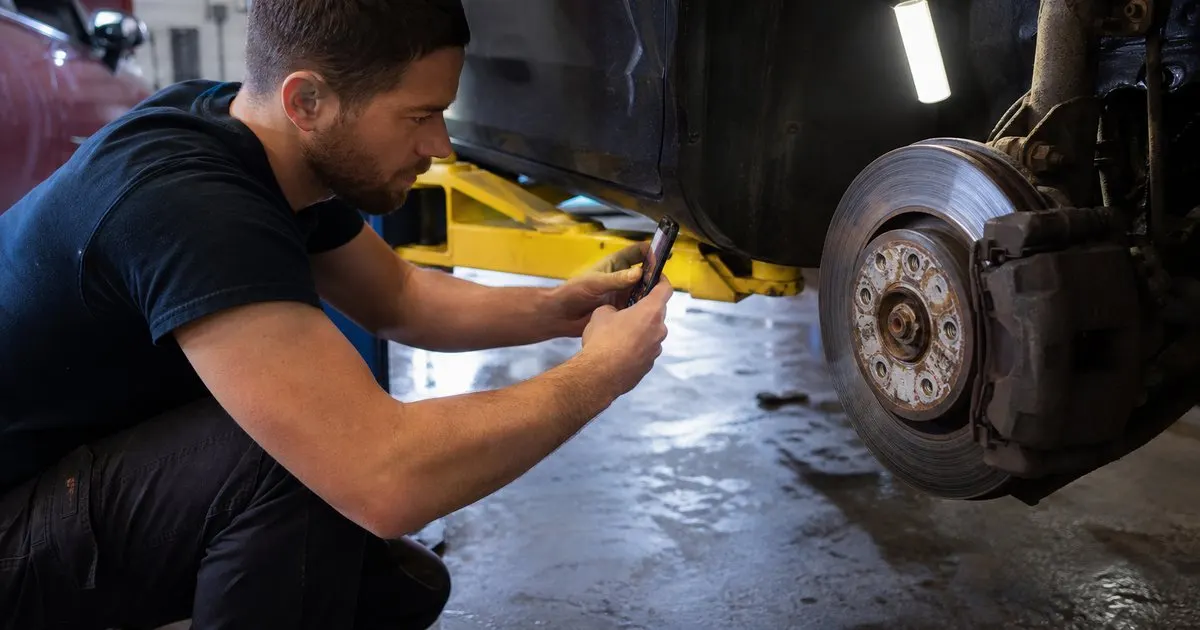
Shoot the problem, the comparison, and the context
The most persuasive estimate photos answer three questions in order: what is wrong, how bad is it, and where is it on the car. A photo of a cracked serpentine belt shows the problem. A photo of the crack next to a ruler or a finger for scale, or beside a new belt if one is on hand, shows how bad. A wider shot of the engine bay with the belt visible shows context so the customer can connect the close-up to their own car. Three photos, thirty seconds.
For measurable wear items, the photo should include the measurement. A brake pad against a gauge, a tread depth gauge in the tire groove, a battery tester's printout, or a fluid sample next to fresh fluid on a white paper towel. Customers may not know what the number means, but they understand a photo of a measurement being taken far better than a verbal claim that something is at the limit. Related: What information should a repair status update text message include for customers?
Keep reading: How do you keep customers informed about their car repair status all day?, What is the best way to run a repair shop job board smoothly?, Why do customers get frustrated waiting for auto repair status updates?. See how GarageTrackr helps you auto repair job board with live status for customers.
Skip the photos that create doubt or noise
Not every photo helps. Blurry shots, photos so close nobody can tell what they are looking at, and photos of things that are fine but worth mentioning all dilute the message and invite questions. If a component looks bad in real life but photographs as an ambiguous dark blob, take a moment to reposition a work light, or skip the photo and describe it in one sentence instead.
Be careful with photos of unrelated issues discovered along the way. They belong on the inspection report, not attached to the main estimate line, and they should be clearly labeled as a separate recommendation. Mixing a photo of brakes worn to metal with a photo of a dirty cabin filter in the same set makes the urgent item feel like upselling.
Label each photo in plain language
A photo without a caption is a puzzle. Every attached image should carry a short line that a customer can understand, such as left front brake pad worn to the wear indicator, or oil leak at the valve cover gasket seen from below. Avoid part numbers and abbreviations in captions. The parts list on the estimate already handles that. The caption's job is to translate the picture into the reason for the line item.
Many job boards let the tech attach the photo directly to the specific line on the estimate, which is better than dumping all images at the bottom. When a customer sees the photo beside the price for that repair, approval decisions get faster and calls asking which item is the expensive one mostly stop. If your tool cannot do that, number the photos and reference the numbers in the estimate notes. Related: Why do customers get frustrated waiting for auto repair status updates?
Make it a habit that survives a busy day
Photo documentation dies when it depends on the tech remembering. Build it into the status flow: the job cannot move from diagnosis to needs approval until at least one photo is attached to any line over a threshold the shop sets. That gate is mildly annoying on a quiet day and invaluable on a chaotic one, because it is exactly on chaotic days that a tech would otherwise skip it. Related: When should a shop text a customer for approval on extra repair work?
Keep the tooling simple. A phone the tech already carries, or a shop tablet with a case that can handle grease, is enough. What matters is that the photo goes from the phone to the job card in one step, without emailing it to the advisor, and that the advisor can send it to the customer in one more. A photo that takes four steps to reach the customer will not reach the customer. Related: How do you keep customers informed about their car repair status all day?
- Attach three kinds of photos per issue: the problem, a scale or comparison, and a wider context shot.
- Include the measurement in the frame for wear items like pads, tires, and fluids.
- Caption every photo in plain language and attach it to the specific estimate line it supports.
- Gate the move to needs approval on a photo being attached so the habit holds on busy days.

Julien Jimenez
Julien Jimenez is an independent software builder based in Paris. He designs, ships, and operates focused SaaS products for small businesses and independent professionals. Read the full author page.
A Job Board Customers Can Follow
Auto repair job board with live status for customers. GarageTrackr is built to help you put this into practice.
Start free trialMore from the GarageTrackr blog
How do you keep customers informed about their car repair status all day?
What is the best way to run a repair shop job board smoothly?

Why do customers get frustrated waiting for auto repair status updates?
Get the GarageTrackr playbook
Practical guides on auto repair software, straight to your inbox as we publish them. No spam, unsubscribe any time.